
Why Your AI ‘Forgets’ and How to Build Patent Drafting Workflows That Don’t
During our November IPWatchdog webinar on AI prompting for patent drafting, one question came up more than any other: “Why does the model forget details as my draft grows?”
It’s a frustrating experience that goes something like this:
- You start by inputting a strong disclosure.
- The AI generates solid claims and a clean independent.
- Then, somewhere around dependent claim 15 or the third embodiment, it drops a critical limitation, contradicts itself, or ignores something you explicitly told it to include.
This behavior is often attributed to “AI hallucination” or poor prompting.
But that’s not what’s happening.
The real issue is context loss and it’s a system limitation. Unlike shared generative tools that generalize across users, private AI models are trained exclusively on your law firm’s work product, your briefs, your formatting logic, your clients’ preferences. As a result, they don’t just draft faster. They draft like you. And that changes everything.
Table of Contents:
- What are Context Windows?
- Why Patent Drafting Breaks LLMs
- How Patent Practitioners are Effectively Using AI
- Practical Takeaways for Patent Professionals
- Why Junior Patent AI Agent Simplifies this Process
TL;DR
When AI “forgets” details during patent drafting, it’s related to a “context window” and attention limits. Long disclosures, nested claim dependencies, and compounding instructions overwhelm a model’s working memory, causing dropped limitations and inconsistencies. Effective patent drafting using AI comes from structured workflows that break drafting into focused steps, reintroduce only relevant context, and verify outputs. AI works best as a force multiplier within discipline, not as a replacement for professional judgment. Junior is a patent drafting tool built specifically to support that approach.
What a Context Window Actually Is
A context window is the maximum amount of text an AI model can consider at one time. It functions as the model’s working memory, defining the total input and output tokens it can process in a single pass.
Every large language model operates with a finite context window, and that capacity varies widely across models. Among commonly used OpenAI models, newer GPT-5.2 and GPT-5 mini variants advertise context windows up to 400,000 tokens, which equates to roughly 280,000–320,000 words depending on formatting and content density. Anthropic’s Claude 4.5 provides a 200,000-token standard context window (approximately 150,000 words).
While hundreds of thousands of words feels like a large volume of memory to work with, a large context window does not guarantee reliable use of all information processed by the model.
There are two distinct failure modes that are often described as “the model forgetting”:
Context truncation (hard failure)
When total input plus output exceeds the model’s context limit, earlier portions of the conversation or document are dropped (typically from the beginning), sometimes without a clear warning. In these cases, the model literally cannot see that text anymore.
Attention decay (soft failure)
Even when information remains technically within the context window, content buried deep in long inputs may be de-prioritized as generation progresses. The model allocates more attention to recent tokens and its own prior output, causing earlier constraints, requirements, or definitions to be inconsistently applied. The text is still present, but it no longer meaningfully influences the output.
From the model’s perspective, this is not “forgetting.”
In hard failures, the text is gone. In soft failures, the model is optimizing locally, favoring proximity and coherence over global compliance.
In patent prosecution, these failures are not cosmetic. Dropped limitations, inconsistent terminology, or violated constraints can directly impact claim scope, enforceability, and Office Action outcomes.
Why Patent Drafting Breaks AI Faster Than Other LLM Usage
Patent drafting is uniquely vulnerable to context loss for a few reasons:
Length
Disclosures run long. Add detailed claim instructions, prior art summaries, and examiner guidance, and you’re easily past 20,000 words before you start drafting.
Cross-dependencies
Claims reference the specification. Embodiments build on each other. Limitations nest and combine. If the model loses track of an earlier definition or element, the entire draft starts to drift.
Precision requirements
You can’t approximate in patent drafting. A claim that drops “substantially parallel” or reverses a structural relationship isn’t just imperfect, it’s wrong.
Compounding instructions
Practitioners often add clarifications mid-draft: “Actually, make sure every dependent references the optical sensor,” or “Go back and tighten the transitional phrases.” Each new instruction loads more text into the window, pushing older content out.
The “Lost in the Middle” Problem with Context & Prompting
Your important information may also be getting “lost in the middle.”
Research published in Transactions of the Association for Computational Linguistics by Liu, Lin, Hewitt, and colleagues identified what they call the “lost in the middle” phenomenon. In their study, the researchers found that language models exhibit significantly higher performance when relevant information appears at the beginning or end of the input context, with performance degrading substantially when critical information is buried in the middle, even for models explicitly designed for long-context tasks.
As the authors note, AI output performance “significantly degrades when models must access relevant information in the middle of long contexts, even for explicitly long-context models..”
This means that even if you’re technically within the token limit, placement matters enormously.
For patent drafting, this creates a compounding problem: the model might de-prioritize specifications or limitations that appear in the middle of your prompt.
Why “Paste and Hope” Fails
Paste and Hope: the art of pasting an entire disclosure into an AI prompt, adding a few sentences of instructions, hitting enter, and hoping the output is usable.
It’s the equivalent of handing a junior associate a 50-page technical document at 4:00 PM and saying, “Draft claims by end of day. Make sure you cover everything.”
Both the AI model and the associate will produce something. It might even look good at first glance. But details will be missing, relationships will be muddled with your colleague, and you’ll spend more time fixing it than if you’d broken the task into manageable pieces.
The issue isn’t effort from the model or the associate, it’s cognitive load. Humans have working memory limits. So do AI systems. When you overload either one, quality degrades.
The difference is that a junior associate will tell you they’re overwhelmed. AI can just quietly drop context and keep drafting.
How Experienced Practitioners Actually Use AI
The practitioners who get consistent results from AI don’t rely on better prompts alone. They design workflows that respect system limitations.
Here’s what that looks like in practice:
1. Break Drafting Into Contained Units
Don’t try to generate an entire specification in one pass. Draft the abstract first. Then independent claims. Then dependent claims, grouped by concept. Then specific embodiments. Each task gets its own focused prompt with only the relevant context loaded.
2. Re-Introduce Only What Matters
When you move to dependents, you don’t need to reload the full disclosure. You need the independent claim, the relevant technical details, and your instructions.
Pull forward just the excerpts that matter for the current task. This keeps the context window clean and focused.
In Claude’s developer guides for increasing output consistency, they say it best “Break down complex tasks into smaller, consistent subtasks. Each subtask gets Claude’s full attention, reducing inconsistency errors across scaled workflows.”
3. Understand that AI has Limited Working Memory
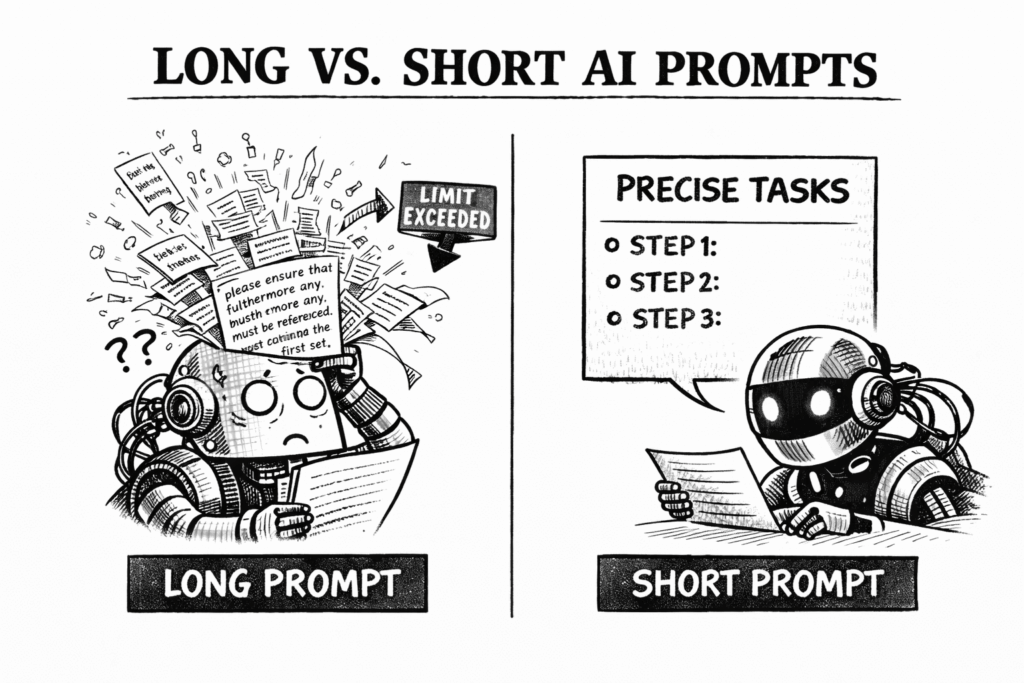
This isn’t about “dumbing down” your instructions, it’s about task segmentation.
Give it one clear task. Let it complete that task well. Then move to the next.
4. Verify and Iterate
AI drafts are not finished work. They’re structured starting points that require professional review. Check for dropped limitations, inconsistent terminology, and logical gaps. If something’s missing, re-introduce the relevant context and regenerate that section.
This workflow isn’t slower, it’s more reliable. And reliability is what matters in patent drafting.
Practical Takeaways for Patent Professionals
The skill shift here is important. AI drafting isn’t about writing the perfect mega-prompt. It’s about workflow design.
You need to understand how context windows work, where your tools break, and how to sequence tasks so the AI has the information it needs, without overloading it.
This is systems thinking. And if you’ve ever built a prosecution workflow, or designed a docketing process, or structured a prior art review.
You already do this. You’re just applying it to a new component in your toolkit.
A few practical takeaways:
- Assume the model can’t see everything. If you’re pasting more than 10,000 words into a single prompt, you’re likely exceeding the effective working window for most tasks.
- Front-load critical information. The model weighs recent input more heavily. If there’s a must-have limitation, put it near the end of your prompt.
- Don’t conflate length with completeness. A 50-page disclosure doesn’t guarantee a complete draft. Segmented prompts with targeted context produce better results.
- Test your workflow. Draft a dependent claim set. Check if the model remembered all the independent claim limitations. If it didn’t, restructure your process.
- Remember that you’re using a tool. AI is a powerful drafting and analysis tool, not a substitute for professional judgment. It can accelerate work and surface patterns, but it does not understand risk, client objectives, or prosecution strategy like a seasoned practitioner. Those decisions remain squarely with you. The most effective results come from pairing disciplined AI workflows with human expertise, not replacing it.
How Junior Addresses AI Patent Drafting Complexities
At Junior, we’ve designed an AI-powered patent drafting platform with AI complexities in mind, treating AI as a component in a structured workflow, not a replacement for professional judgment.
Because we’re patent attorneys who actually use these tools in practice, we built Junior to work with context window limitations rather than pretending they don’t exist. We also recognize that not every practitioner wants to become an AI engineer. Some just want reliable drafts without thinking about tokens, prompt structure, or context windows. Others want precise control over how the AI behaves and what prompts it uses. Junior is a tool that handles both.
Built-In Prompt Chains with System Prompts.
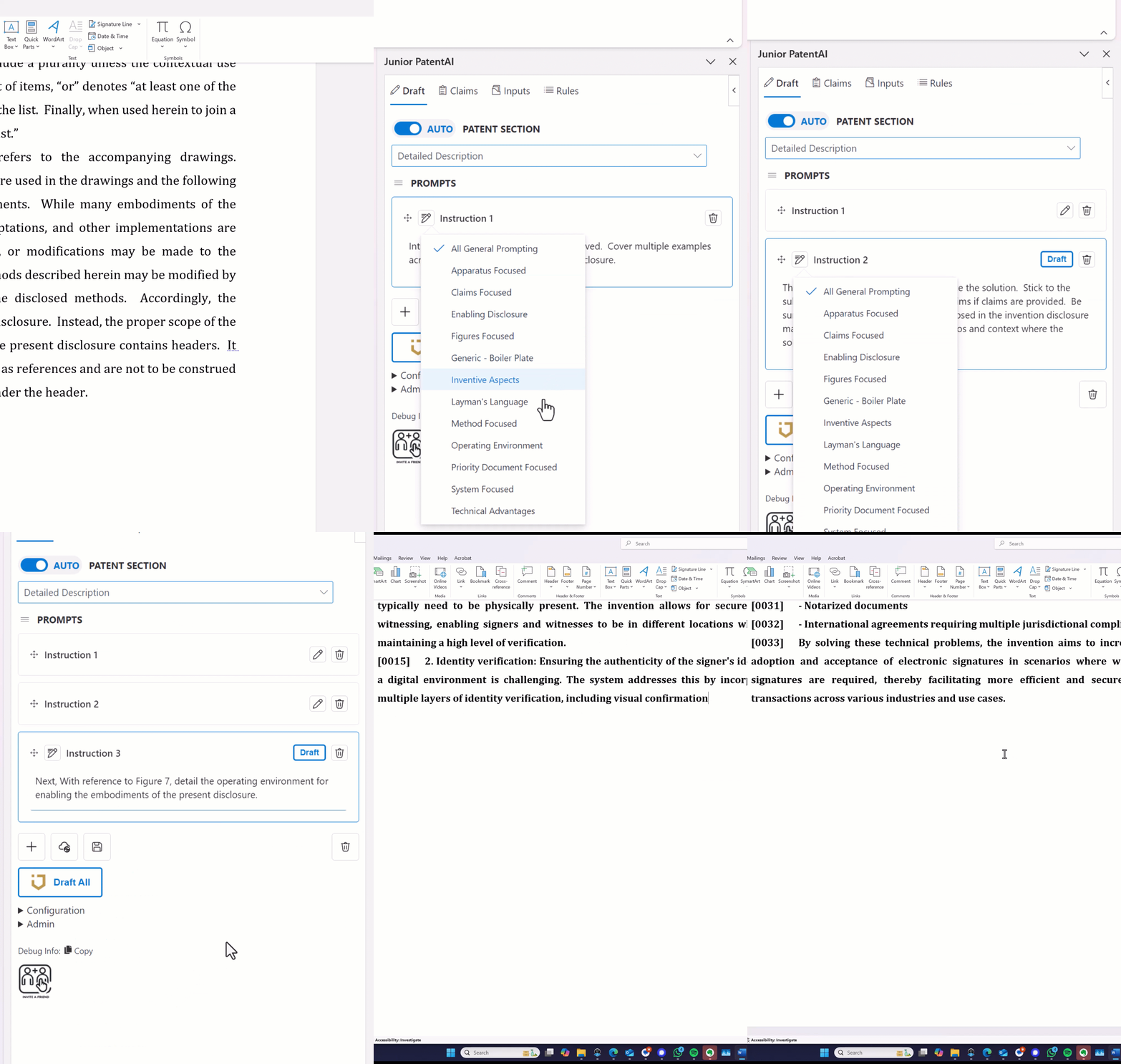
Junior includes pre-configured prompt chains for common drafting tasks: claim generation, Office Action responses, specification sections. Each chain is a sequence of linked prompts optimized for that workflow, with context management built in. When you’re drafting claims, the chain loads your disclosure in segments, generates independents first, then systematically builds out dependents while maintaining antecedent basis. You’re not manually engineering prompts or guessing what context to include at each step. The platform handles the sequencing.
Prompt Sequencer: Capture Your Workflow.
Junior’s Prompt Sequencer can reverse-engineer your work, analyzing how you drafted a specification or responded to an Office Action. From there, the prompt sequencer builds a reusable prompt chain from it. This eliminates the guesswork entirely. You build your process once, and the platform executes it consistently without hitting context limits or dropping critical information. This workflow can be demonstrated directly within Junior’s prompt sequencer.
Integration with Microsoft Word.
Rather than forcing you to work in a black-box interface where you can’t see what’s happening, Junior integrates directly with Word. Your full document remains accessible and visible, but the tool manages what gets fed into each step. You maintain complete control and transparency over the drafting process.
Model Flexibility Across Workflows.
Junior allows you to switch between different AI models depending on your specific task and preference. Need faster turnaround on routine dependent claims? Use a lighter model. Working on complex claim construction or Office Action responses where nuance matters? Switch to a more advanced model. You can select models at the task level without rebuilding your entire workflow, giving you the flexibility to optimize for speed, cost, or sophistication depending on what the work demands.
Custom AI Agents for Specific Tasks.
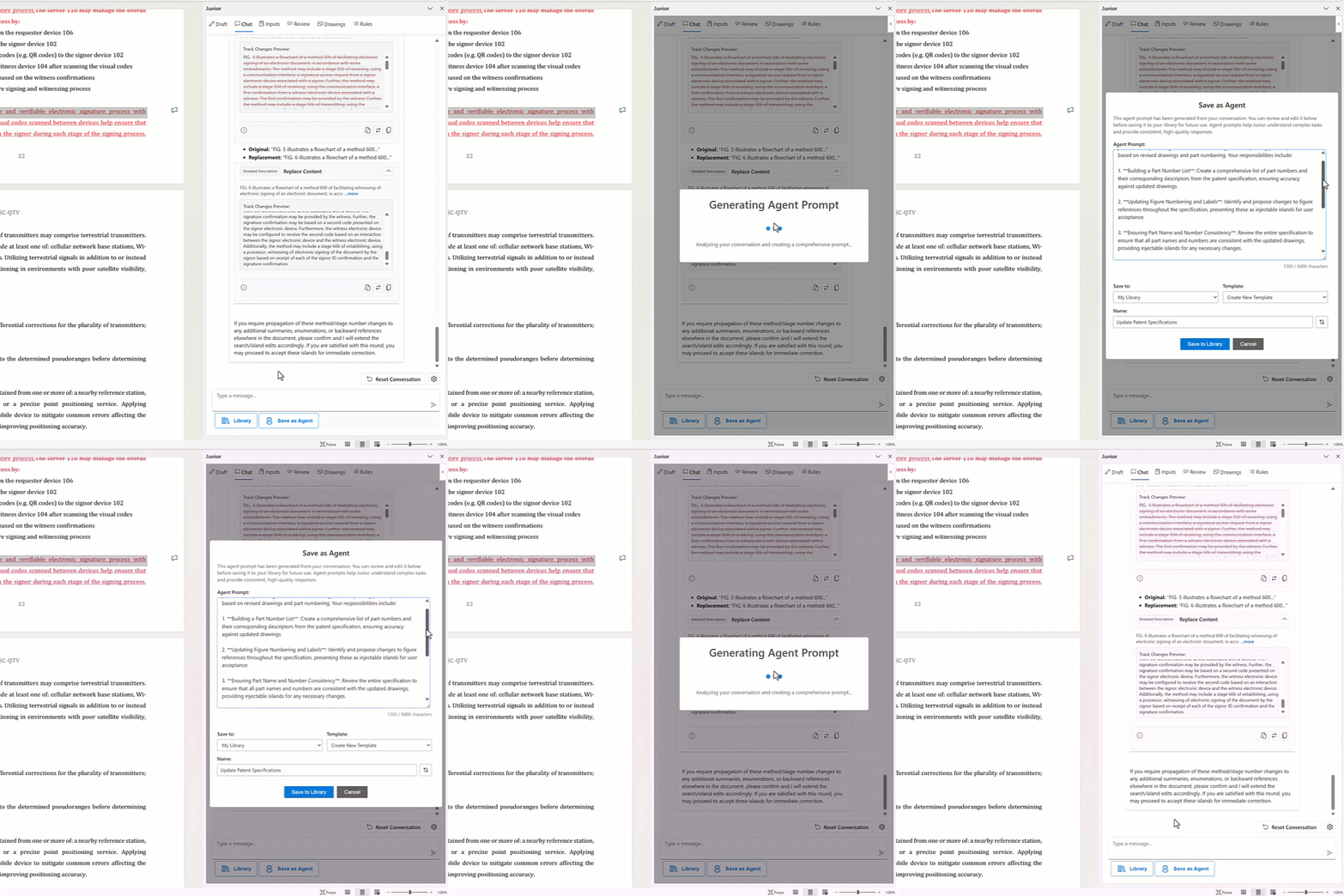
Instead of relying on general-purpose prompting, Junior also provides specialized agents pre-configured for patent-specific subtasks. Each agent is designed with appropriate context windows and information hierarchy for its specific function, whether that’s claim drafting, Office Action response, or prior art analysis. This eliminates the “paste and hope” problem entirely. Additionally, you can build Patent AI Agents within Junior based on your own workflows to automate future drafting processes.
Whether you want Junior to handle the technical details or you want granular control over prompt behavior, you get consistent, reliable outputs because the system is designed around how these models actually work. We’re not trying to make the AI “smarter”, we’re building a workflow that respects its limitations and leverages its strengths.
The Bottom Line
AI is a force multiplier when you design your process around how these systems actually work. Context windows are real. Limitations exist. Ignoring them doesn’t make your drafts better, it just makes the failures harder to predict.
The practitioners who are getting value from AI aren’t the ones with the most elaborate prompts. They’re the ones who broke their drafting process into clear, manageable steps, fed the model what it needed, and verified the output.
And if you’ve been drafting patents for any length of time, you already know how to do that.
Happy prompting!
And if you’d like to see how Junior simplifies this in practice, we’re always happy to walk through the platform and show how it applies real-world insight from a leadership team of patent attorneys who understand both the technology and the bar.
About Junior
Junior is the AI associate that never quits. Built by patent lawyers for patent lawyers, the patent AI agent ends the “junior associate problem” — where firms spend more than $200,000 training talent that leaves in 18 months. Pre-trained on partner-level judgment and firm-specific style, Junior integrates seamlessly with Microsoft Word and cuts drafting time 60% on average. No prompt engineering. No workflow changes. Just consistent, defensible output from day one. With enterprise-grade security (SOC 2, ISO 27001, ISO 42001), Junior enables shared prompt libraries that lock in institutional knowledge across practice groups. It scales infinitely — no headcount, no burnout, no benefits. For solo practitioners and small firms, Junior is the trained associate they cannot afford to hire. For large firms, it is the retention strategy they cannot afford to ignore. Junior does not replace lawyers — it clones senior expertise for repetitive tasks, freeing attorneys for strategy. In patent law, where training is costly and expertise scarce, Junior is the first AI that preserves knowledge, reduces churn and grows with the firm — in perpetuity. Learn more at junior.law.